Tuesday, August 4, 2026

My own OS (UX/RT) now runs a shell

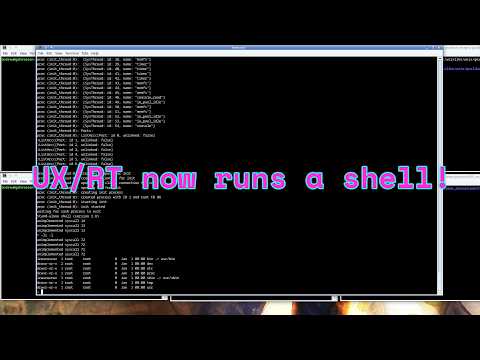
If you've watched some of my earlier videos or seen my posts here or on Discord, you might have seen that I've been working on my own QNX-like OS. Up until fairly recently, UX/RT only ran hardcoded tests built into the process server and had nothing to interact with, but now I have it running a minimal shell and a few other user programs. A demo VM image is now available on the dedicated site that I just set up for UX/RT, as well as in the Virtual OS Museum.


 It's still quite preliminary though; rather than a regular shell like bash, the shell I've ported is sash, which is a minimalist shell with built-in implementations of common commands intended for system recovery purposes, which also makes it ideal for early bringup of a new OS. I've also ported a couple programs from the BSD games package. The first of these is banner, which displays an ASCII art banner of user-provided text. The second is the game Hunt the Wumpus, the Unix version of which dates back to Fourth Edition Research Unix from 1973, the first version to have a kernel written in C.


 Still, a lot is unimplemented, and it's quite a ways away from the full-featured workstation and embedded OS I want to to be. There are no I/O device drivers except for the console serial port, and even that is a temporary hack built into the process server, since there isn't yet any support for the arbitrary user-level server processes characteristic of microkernel OSes. Everything is just running out of an in-memory filesystem built into the boot image that's basically the equivalent of Linux's initramfs. A lot of APIs are still unimplemented, and what is implemented is just enough to be able to run the stuff that's there. Performance also leaves a lot to be desired, for various reasons.


I've definitely learned a fair bit since I made my original video on UX/RT. seL4 turned out to be less than ideal for this kind of OS to say the least. By the way, if you want more information on how microkernel OSes work, there's a link in the description to an introductory video I made on them. Initially I'd planned to track upstream seL4 and use asynchronous message queues and per-thread buffers to support transferring arbitrary-sized messages between threads, but that would have ended up being overcomplicated and would have suffered from priority inversion in some situations, so I instead decided to fork the kernel and add support for QNX-style task-to-task copying of arbitrary-sized messages in the kernel itself. However, my implementation of that isn't very well optimized, and it still doesn't integrate asynchronous notifications with synchronous message passing the way QNX does with pulses. There's still also the issue of the convoluted seL4 memory model, which imposes a dependency cycle on memory allocation and requires making a separate system call to map each memory page, which isn't particularly good for performance on a general-purpose OS that allocates memory frequently. There's also seL4's use of a giant kernel lock meaning that only one thread can make a system call at a time, which also isn't good for performance either. Having the process server separate from the kernel rather than built into it as QNX does limits performance as well, and I can't see any really major disadvantages to colocating it in the kernel.

I could try to fix these issues in the existing seL4-derived kernel, but I'm probably better off trying to switch to another kernel. I'm thinking I'll base the new kernel on a fork of L4Ka, which was an older L4 kernel that had support for arbitrary-size message passing unlike seL4, meaning it should have a more optimized implementation than the rather hacky one in the current kernel. It also used fine-grained locking rather than a single giant kernel lock, so that's another thing I won't have to add. I will have to change it from using thread IDs to file descriptors as destinations for messages, which hopefully shouldn't be too difficult. I will also have to replace the memory management code based on recursive address spaces. Since I will be colocating the process server in the kernel, this hopefully shouldn't be too difficult either because the process server should just be able to manipulate page tables directly. I really wish I would have just done something like this from the beginning. I wasted lots of time fighting with seL4's memory and message passing models and would have probably spent less time converting some other kernel like L4Ka instead of trying to work around seL4's limitations. seL4 actually is pretty decent for the kinds of static embedded systems it's most commonly used in, but it's certainly less than ideal for a highly dynamic QNX-like OS such as UX/RT.

By the way, if anyone else is interested in contributing, I'm definitely open to that, and it should be easier now that I have user programs working and there are more possibilities for things to implement in parallel.

If you wish to support me monetarily, you can check out my Patreon and Ko-fi. Patrons get early access to my videos and a shoutout at the end of my videos and in the OS museum credits file. Anyway I think that's about everything. Thanks for watching.


Friday, June 19, 2026

Virtual OS Museum update - early TempleOS, Unite, IRIX improvements, and more


I've now added a few new OS installations to the Virtual OS Museum. These are available both as updates in the launcher for people who downloaded previous versions, as well as complete images avaliable for download on the site.


ls and tsk commands on Unite

First off is Unite, a QNX-like OS from the late 80s and early 90s. It looks kind of like a 32-bit version of QNX Classic, and it beat QNX itself to having proper 386 support by several years; I don't think QNX had full 386 support until 4.1 in 1994. It seems to be closer to being a proper functional Unix than QNX Classic, but still has some significant differences. As you can see, it uses drive number prefixes like QNX Classic, although unlike QNX Classic it has Unix-style device names, but these don't seem to appear in the filesystem at all. It still seems to suffer from a few issues; if I try to boot it from the hard drive, it just reboots, probably from a triple fault, so I have to boot it from a floppy instead. It also includes a window system, but the keyboard and mouse don't work. The original developer was unable to get hard disk booting or input in the GUI to work either since he abandoned it a long time ago. Full sources are available, so maybe I should try to see if I can fix those issues at some point.


ABCenix running its window system with a terminal emulator

Next is ABCenix, the OS for the ABC 1600, which was a mid-80s low-end 68k-based workstation from the Swedish companies Luxor and DIAB. This was probably the only workstation based on the 68008, which was an uncommon version of the 68000 with an 8-bit data bus instead of the 16-bit bus of the regular version. I think the only other non-embedded and non-homebrew machine based on it may have been the much more well-known Sinclair QL, which is definitely not a workstation. ABCenix is based on DIAB's extensible real-time Unix known as DNIX, and kind of resembles System III or early System V, but it has relatively little AT&T code and is based on a rather different architecture. One of the biggest user-visible differences is support for filesystem servers running as ordinary user programs, which was pretty uncommon on Unix-like OSes at the time. The window system is one example of such a server; there's also one for record-oriented files. Unfortunately the graphics emulation is rather glitchy as you can see here, even though the OS appears to be pretty stable.


J OS logged into the "generic" account

The foreword for the Moses comics

I've also installed J OS, which is the second earliest version of what would later be known as TempleOS available as a bootable image, dating back to 2005. The earliest available version, which was known as Hoppy, just hangs asking for a floppy in every emulator I've tried it in. It's already quite similar to later versions of TempleOS, although it has fewer applications and features and is much less developed. Even at this point Terry Davis made his, shall we say, idiosyncratic religious beliefs pretty obvious if you know where to look, although back then I missed that and never actually managed to get this version running in emulation until now. This version seems to be somewhat laggy in emulation unlike later versions.

Directory listing of the Aquarius+ SD card
Tetris for Aquarius+

Another OS I've installed is plusBASIC for the Aquarius+, which is a modern enhanced clone of the very short-lived Mattel Aquarius home computer. In addition to the Z80 of the original it also has an ESP32 and an FPGA, although the emulator is only fully emulating the Z80, with the FPGA only being emulated at the I/O interface level and the ESP code running on the host CPU rather than an ESP emulation. The original Aquarius only supported tapes and cartridges, whereas the Aquarius+ uses an SD card, with plusBASIC implementing extensive filesystem support. Also unlike the original, which only supported a text mode with a fixed ROM font that included some dingbats to use as a limited form of graphics, the Aquarius+ supports a true graphics mode. It also includes a port of CP/M using disk images on the SD card.

OPUS running in the GUI Litton emulator

Blackjack for the EBS 1231

Last is OPUS for the Litton EBS 1231, which was a late-60s/early-70s low-end office computer for small businesses from what was formerly Royal McBee, better known for the LGP and RPC series. This emulator was written as part of Usagi Electric's project to restore an EBS 1231 that ended up being put on hold because an exploding capacitor damaged the ribbon cables used as interconnects, but not before the drum was imaged allowing OPUS to be run in emulation. The EBS 1200 series appears to be a cost-reduced successor to the LGP and RPC machines, and was probably one of the last machines to use a drum for main memory. By this point, core was very common, and early semiconductor RAM ICs were already starting to become available, so drum main memory was nearly extinct in new hardware by this point. OPUS is kind of similar to the primitive resident monitors found on much older machines like the the Mark 1 and Pegasus, although unlike those it includes a very simple command line intended to be used from a terminal, and it also includes a somewhat higher-level assembly-like language that abstracts away things like the implicit jump after every instruction found on this and most other drum-memory computers, but it also has some support for running machine code programs as well. Similar to the LGP and RPC machines, there's a blackjack game for the 1200, but I don't think it was written by Mel from the well-known story.

IRIX 6.5.22m running in IRIS

In addition to installing new OSes, I've also moved the IRIX images from MAME to IRIS, which is faster by an order of magnitude or more depending on the host CPU, apparently even running a few times faster than a real Indy on some hosts. I've also made some changes to the images themselves, like setting an actually working network configuration and installing the graphics demos that were missing from the 6.5 image.

I have also fixed the jumpy pointer with OpenGL enabled in QEMU, fixed an issue where the lite edition would incorrectly try to use a local repository when downloading installations if updates on startup were disabled, and added an option in the launcher settings window to disable nested virtualization, which apparently causes QEMU instances running within the VM to hang on certain Windows hosts with AMD processors; all of these fixes are also available through the launcher. I've enabled 4-way SMP for the host QEMU as well; for some reason I forgot to enable it before. If you already downloaded a previous version, you can enable SMP by extracting the external update zip file over the folder from the previous version. I think that's about everything as far as this update is concerned. In other news, I've started on my first major emulator development project since starting a blog and YouTube channel and releasing the OS museum, and will make a video and blog post on it soon. I also am continuing to work on UX/RT and should have it running user processes soon as well.


Tuesday, June 2, 2026

A new bug fix release of the Virtual OS Museum is available


I have released an updated version of the Virtual OS Museum with various bug fixes. The new release doesn't include any new OS installations, but it does fix most of the major issues people were reporting. It turns out that VirtualBox is less than ideal for this kind of thing, and other people were having major issues related to configuration file handling and mouse input that didn't show up on my machines for whatever reason. The new release uses QEMU instead of VirtualBox by default on Linux and Windows on both x86 and ARM, which should hopefully be more reliable. I've also fixed the issues inside the VM with things like missing files on the lite edition that people were reporting, although I still haven't fully tested all installations and testing is still ongoing. If you've already downloaded the previous version, you should download the external update zip file from the site, extract it over the folder from the previous version, boot the VM, and if you don't have automatic updates enabled, you should check for updates from the File menu of the launcher.

In addition to testing the installations that are already there, I'll start installing new VMs right away as well. These will become available in the launcher as I finish installing them, and I will also be posting at least a few screenshots of each new VM on social media. I'll also be starting on my first major emulator development project within the next few days, so stay tuned for updates on that as well; it is almost certainly going to be a series of a few videos and blog posts.

And if anyone had seen my video from a few years back or the few posts I've made about it, I still haven't forgotten about my own OS. UX/RT is likely just one commit away from running actual user programs. After that, it should only be a few more commits until I have it running a shell. As soon as I have a version that runs a shell that you can actually interact with, I will be adding it to the OS museum of course in addition to uploading images to the UX/RT GitLab project.

Before I end this video, I just want to thank everyone who's commented, joined my Discord, and supported me on Patreon and Ko-fi. Before I released this, I wasn't sure how much interest I'd actually get. I've got a pretty significant tendency to withdraw and stay quiet, and I've known little more than isolation and invisibility for most of my life. I wasn't sure if there was anything I could do to change this, but I'm very thankful to have been proven wrong. I certainly have no shortage of OS- and emulation-related projects to work on and content to make about them, and hopefully a decent number of people continue to be interested in my work.

Tuesday, May 19, 2026

I've released a virtual museum with nearly every OS you can think of...


Today I am (finally) releasing the Virtual OS Museum, which is the world's first multi-platform interactive virtual museum of operating systems and standalone applications, implemented as a Linux VM.

Nearly all well-known OSes and platforms (and many obscure ones) are included in some form, spanning the entire history of stored-program computing from the 1948 Manchester Baby to the present day. This is the result of over 20 years of collecting emulators and VM images; over 1700 VM installations are included, across over 250 platforms, representing nearly 600 distinct OSes.

I have put a lot of effort into making this readily accessible; all OSes and emulators are pre-installed, and a cross-emulator graphical launcher with a snapshot feature to revert VM installations to a working state is included. Shortcuts to run the OS museum VM on Windows, macOS, and Linux are included (and it is possible to run it on pretty much anything that runs QEMU or VirtualBox).

The main window of the launcher

Unix PC SVR2 and XVM/RSX with the launcher in the background

Even though the state of software preservation has definitely improved over the past two decades, with many different archive sites being put up and emulators of obscure platforms being written, many of these projects are not particularly accessible, with emulators and OSes often requiring complex setup, and regressions in emulators breaking certain OSes in later versions. This project is an attempt to make readily accessible as much of the history that's been preserved in various places as possible.

Softlanding Linux System 1.0


For people who don't want to download the full version (which is around 170G) there is a much smaller lite version (around 20G) that includes only the base Linux system with the installer, emulators, and launcher, downloading guest VMs the first time they are run rather than having everything included.


Currently, while I have tried to test at least one guest installation for each emulator within the OS museum VM, and all guests have been confirmed to work at some point in the past on my machine, testing of all guest installations within the OS museum VM is still an ongoing process (a little under half have been tested so far).

AFROS with XaAES and TeraDesk


I will be continuing to add VMs to this project; I still have enough install images sitting around that I can easily reach well over 2000 VMs. This also includes some OSes that don't currently run in emulation because the emulator is incomplete or broken.

I also have a YouTube channel where I will be posting about my efforts to fix OSes currently broken in emulation, as well as reviews/tours of OSes I've already installed. I also have a Discord/Fluxer community where you can discuss retrocomputing and OS development, suggest stuff to add, or report issues. If you wish to support me monetarily, you can subscribe to me on Patreon or send me a tip on https://ko-fi.com/andreww591.

Sharp Personal CP/M for MZ-2500

I had thought I would be releasing this a lot sooner. I had been focusing almost exclusively on UX/RT for a while because I had some people from a major conglomerate interested in using it as replacement for QNX to the point where they paid me to fly out to meet them, but a couple months after I met them they cancelled/suspended their project, and I started focusing more on getting the OS museum ready for release, and getting it to a point where it's actually half-decent took way more work than I thought (at one point I was thinking of possibly just doing a quick-and-dirty release without a graphical launcher but then decided I was going to make something more approachable). 

LisaOS 3.1


In addition to adding new OSes and emulators to the OS museum, I'm going to be working on UX/RT again soon and am probably one commit away from getting simple user-level test programs working on it, with a shell soon to follow. I haven't really done much with it at all for a while because I was focusing almost entirely on the OS museum, but now I will try to split my time between both projects about equally. I hope that I get commercial interest in UX/RT again once it's actually running user programs, but I'm not sure if that will ever happen again because of my severely crippling tendency to stay quiet that makes it extremely difficult to make connections with people. I will of course be posting regular updates about both UX/RT and the OS museum here and on YouTube. I am going to try as hard as I can to try to push past my tendency to stay quiet; I will probably never be able to talk about random crap all the time like just about everybody else does, but I will try to post about my projects as much as I can going forwards.


My own OS (UX/RT) now runs a shell

If you've watched some of my earlier videos or seen my posts here or on Discord , you might have seen that I've been working on my o...